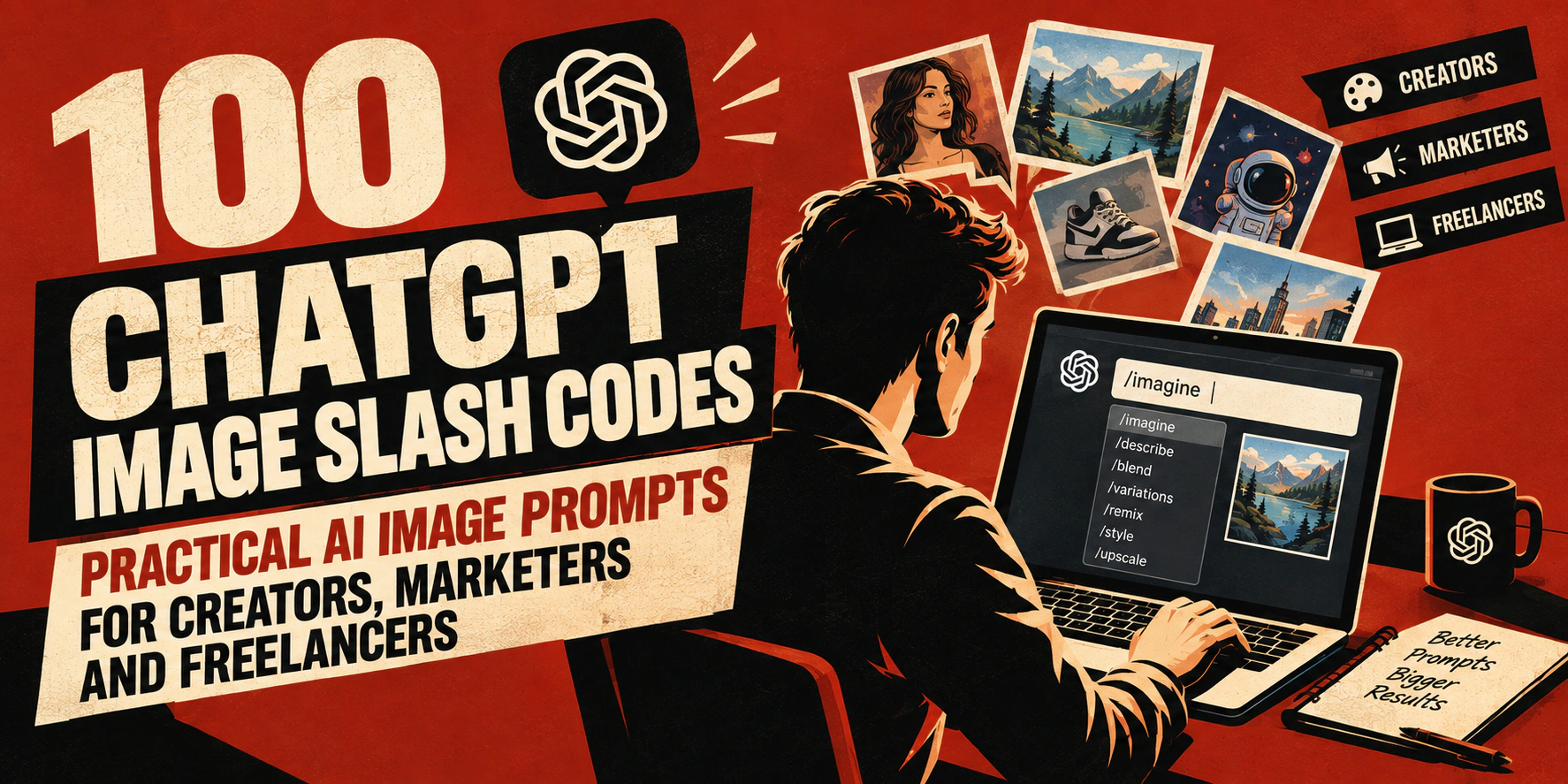
AI image generation has become a practical tool for marketers, freelancers, designers, ecommerce sellers, social media managers and content creators.
However, getting a useful image often depends on how clearly you describe what you want.
Instead of writing a long image generation prompt every time, you can use short descriptive phrases such as /packshot, /blueprint, /pixelart or /adposter to communicate a visual direction quickly.
These are often described as ChatGPT image slash codes.
They are not hidden ChatGPT commands or special system functions. They are simply convenient prompt shortcuts that help the image model understand the type of visual you want to create.
For example:
/packshot premium skincare bottle, clean white background, professional studio lighting
Or:
/adposter running shoes, dramatic studio lighting, vertical social media advertisement
You can also upload an existing photograph and tell the image model which parts should remain unchanged.
For example:
/lifestyle place this exact product on a luxury bathroom counter, soft morning light, preserve the bottle shape, label, colors and proportions
Below are 100 practical ChatGPT image slash prompts with examples covering product photography, architecture, creative design, portraits, fashion, food, gaming, social media marketing and more.
How to Use ChatGPT Image Slash Codes
The easiest way to use these prompts is to combine the slash phrase with additional information about the image you want.
A useful structure is:
Slash code + subject + environment + visual style + important restrictions
For example:
/packshot black wireless earbuds, premium studio photography, soft shadow, neutral grey background
If you are editing an existing product photograph, you could write:
/packshot keep the exact product design, proportions, label and colors from my uploaded image, clean ecommerce background
The additional information reduces the amount of guessing the image model needs to do.
You can also combine related visual ideas.
For example:
/explodedview /techsheet mechanical keyboard showing internal components
However, adding too many different visual styles into one prompt can make the final image confusing. Usually, one main style with a few supporting instructions works better.
Product Visualization ChatGPT Image Codes
These prompts are especially useful for ecommerce sellers, product designers, marketers, manufacturers and anyone creating product presentations.
1. /explodedview
This prompt separates the different components of an object so viewers can understand how the product is assembled.
Example:
/explodedview wireless gaming mouse showing shell, PCB, switches, scroll wheel and battery
This style can work well for product explainers, technical presentations and technology advertisements.
2. /360view
This prompt creates a product presentation showing the object from several directions or angles.
Example:
/360view leather office chair, clean white ecommerce studio background
It can help customers understand the shape and design of a product before purchasing.
3. /packshot
A packshot is a clean commercial product photograph commonly used for advertising and ecommerce.
Example:
/packshot vitamin bottle on a neutral background, professional studio lighting and realistic shadow
If you are using an existing product photograph, tell the image model not to redesign the packaging.
4. /floatingassembly
This creates a visual where the product or its components appear to float separately in the air.
Example:
/floatingassembly smartwatch with watch body, straps and charging unit floating separately
This style is commonly useful for technology and product launch concepts.
5. /ghostmount
This prompt presents a product without showing the stand or support holding it.
Example:
/ghostmount luxury handbag, premium ecommerce photography, seamless background
It can work particularly well for clothing, accessories and catalogue products.
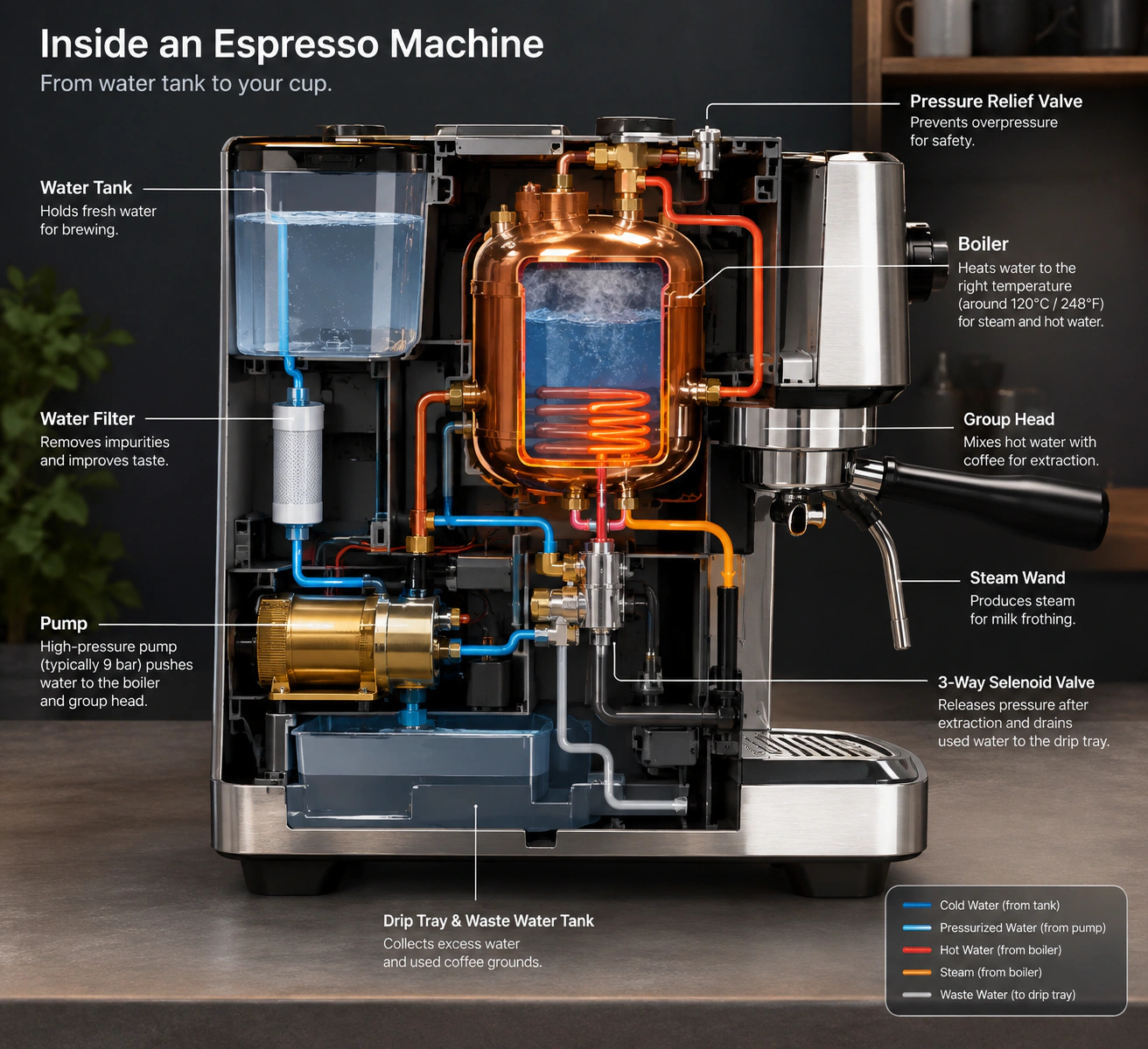
6. /cutaway
A cutaway removes part of the outside surface to reveal what is happening inside the object.
Example:
/cutaway espresso machine showing internal boiler, pump and water system
This can be useful for technical education, product demonstrations and engineering concepts.
7. /techsheet
This style presents a product like a technical specification drawing or product engineering sheet.
Example:
/techsheet electric bicycle, side profile, component labels and clean technical presentation
If accurate dimensions are important, provide verified measurements instead of relying on generated values.
8. /lifestyle
Lifestyle images show a product being used in a realistic everyday environment.
Example:
/lifestyle reusable coffee cup on a remote worker's desk beside laptop and notebook
These images can help potential customers imagine how the product fits into their daily life.
9. /macrodetail
This prompt focuses closely on a material, texture or small product feature.
Example:
/macrodetail mechanical keyboard switch and textured keycap, realistic commercial photography
This can be valuable when selling products where materials and craftsmanship are important.
10. /comparison
This places two products, versions or states next to each other.
Example:
/comparison compact travel backpack beside standard full-size backpack, clean neutral background
For commercial comparisons, make sure any factual claims shown beside the image are accurate.
Science and Nature AI Image Prompts
Science and nature prompts can be useful for educational articles, presentations, environmental content and conceptual illustrations.
11. /microscopicview
This creates an image inspired by something viewed through a microscope.
Example:
/microscopicview leaf surface showing detailed cellular structures
12. /xray
This creates an X-ray-style view showing internal structures.
Example:
/xray mechanical wristwatch revealing gears and internal mechanisms
13. /thermalview
This creates an infrared or heat-map-style image.
Example:
/thermalview laptop during heavy processing load, realistic heat distribution concept
14. /crosssection
A cross-section shows different internal layers of an object or structure.
Example:
/crosssection modern house showing foundation, insulation, walls and roof layers
15. /growthtimeline
This shows several development stages within one visual.
Example:
/growthtimeline tomato seed developing into mature fruit-bearing plant
16. /weathered
This makes a subject appear naturally aged by weather and environmental exposure.
Example:
/weathered wooden sign exposed to sun, rain and wind for decades
17. /bioluminescent
This adds naturally glowing organic details to the environment.
Example:
/bioluminescent forest mushrooms glowing softly at night
18. /ecosystem
This creates a visual showing plants, animals and environmental elements interacting together.
Example:
/ecosystem freshwater pond showing fish, plants, insects and surrounding wildlife
19. /fossilized
This transforms the subject into something preserved as a fossil.
Example:
/fossilized dragonfly embedded inside ancient rock
20. /nightvision
This creates the appearance of a scene viewed using night-vision equipment.
Example:
/nightvision camping area inside a forest after midnight
Architecture and Technical ChatGPT Image Prompts
These prompts are useful for designers, property professionals, developers, architects and anyone preparing visual presentations.
21. /blueprint
This creates a technical blueprint-style drawing.
Example:
/blueprint compact home office desk with components and dimensional callouts
22. /floorplan
This creates a top-down layout of a room, apartment or building.
Example:
/floorplan two-bedroom apartment with open kitchen, living room and balcony
Generated layouts should be treated as concepts rather than professional construction drawings.
23. /isometric
This creates a three-dimensional view commonly used for technology illustrations and diagrams.
Example:
/isometric remote worker home office with desk, monitor, storage and plants
24. /wireframe
This reduces an object to its structural lines or digital mesh.
Example:
/wireframe sports car on dark technical background
25. /axonometric
This creates an architectural projection where several sides remain clearly visible.
Example:
/axonometric coworking office showing desks, meeting room and lounge area
26. /elevation
This produces a straight-on architectural exterior view.
Example:
/elevation modern three-storey townhouse facade
27. /sitemap
This creates a visual representation of a website structure.
Example:
/sitemap recruitment website with jobs, employers, candidates, resources and account sections
28. /topographical
This adds contour lines commonly seen on geographical and elevation maps.
Example:
/topographical mountain landscape with detailed elevation contour lines
29. /miniature
This makes a large environment appear like a small physical model.
Example:
/miniature digital marketing agency office presented as detailed scale model
30. /structural
This emphasizes beams, supports, frames and structural construction.
Example:
/structural modern warehouse showing steel beams, columns and roof supports
Creative and Artistic AI Image Codes
Creative styles can be useful when you want an image that feels more conceptual, artistic or visually distinctive than normal photography.
31. /surreal
This introduces dreamlike or impossible visual combinations.
Example:
/surreal office desk floating above clouds during sunrise
32. /impossibleangle
This creates unusual geometry or perspectives that would normally be impossible.
Example:
/impossibleangle staircase folding through futuristic office architecture
33. /doubleexposure
This combines two different images into an overlapping photographic composition.
Example:
/doubleexposure entrepreneur portrait blended with nighttime city skyline
34. /glitch
This introduces controlled digital distortion and signal errors.
Example:
/glitch cybersecurity analyst portrait with subtle digital distortion
35. /holographic
This creates reflective rainbow-like or futuristic holographic effects.
Example:
/holographic smartphone floating against dark minimalist background
36. /vaporwave
This creates a retro digital look using neon colors, nostalgic computers and futuristic landscapes.
Example:
/vaporwave remote working desk with retro computer, grid floor and neon sunset
37. /inkwash
This produces artwork inspired by traditional ink painting.
Example:
/inkwash mountain village using expressive black and grey brush strokes
38. /papercraft
This makes the scene appear as if it was created using layered paper.
Example:
/papercraft marketing team working around oversized analytics charts
39. /stainedglass
This transforms the scene into colored segmented glass artwork.
Example:
/stainedglass owl surrounded by geometric forest patterns
40. /claymation
This creates the handcrafted appearance associated with clay animation.
Example:
/claymation office team sitting around creative meeting table
41. /origami
This turns the subject into folded-paper artwork.
Example:
/origami eagle flying over minimal paper mountain landscape
42. /mosaic
This creates an image made from small decorative tiles or pieces.
Example:
/mosaic city skyline during sunset
43. /chalkboard
This produces a chalk-drawing style commonly associated with classrooms and educational graphics.
Example:
/chalkboard career planning roadmap showing jobs, skills, interviews and promotion
44. /neonsign
This transforms the text or subject into an illuminated neon display.
Example:
/neonsign WORK FROM ANYWHERE on dark brick wall
45. /graffiti
This creates street-art-inspired artwork.
Example:
/graffiti freelancer workspace mural, energetic urban art style
Portrait and People ChatGPT Image Prompts
Portrait prompts can be useful for creative campaigns, profile concepts, entertainment and personal branding.
If you are generating images of real people, avoid presenting fictional transformations as if they were real photographs or events.
46. /agedforward
This creates an imagined older version of a person.
Example:
/agedforward adult portrait approximately 25 years older, realistic natural appearance
47. /agedbackward
This creates an imagined younger version of a person.
Example:
/agedbackward portrait with naturally younger facial appearance
48. /superheroversion
This reimagines the subject as an original superhero character.
Example:
/superheroversion software developer wearing futuristic technology suit
49. /renaissance
This creates a portrait inspired by historical Renaissance paintings.
Example:
/renaissance portrait of modern entrepreneur in formal historical composition
50. /animeversion
This converts the subject into an anime-inspired illustration.
Example:
/animeversion remote programmer working at desk beside futuristic city window
51. /3danimation
This creates a polished three-dimensional animated character look.
Example:
/3danimation friendly recruitment consultant in bright modern office
52. /actionfigure
This transforms the subject into a collectible action figure concept.
Example:
/actionfigure digital marketer with laptop, headphones and analytics accessories
53. /statueversion
This makes the subject appear as a carved or sculpted statue.
Example:
/statueversion entrepreneur portrait carved from white marble
54. /silhouetteart
This turns the subject into a strong recognizable silhouette.
Example:
/silhouetteart hiker standing on mountain ridge during sunrise
55. /pencilsketch
This creates the appearance of a hand-drawn graphite sketch.
Example:
/pencilsketch professional portrait on textured sketchbook paper
Fashion and Lifestyle ChatGPT Image Codes
These prompts can help fashion creators, influencers, ecommerce stores and personal brands explore different visual directions.
56. /runwaylook
This presents an outfit using high-fashion runway styling.
Example:
/runwaylook minimalist black evening outfit under dramatic fashion show lighting
57. /streetstyle
This places fashion in a realistic urban environment.
Example:
/streetstyle smart casual business outfit in modern downtown environment
58. /vintagefilm
This adds the visual character of older photographic film.
Example:
/vintagefilm coffee shop portrait inspired by 1970s documentary photography
59. /magazinecover
This creates a fashion or editorial cover composition.
Example:
/magazinecover young entrepreneur, professional portrait with clean space for headline
For accurate typography, add the final text using your design software after generating the image.
60. /outfitgrid
This creates several coordinated outfit options in one organized visual.
Example:
/outfitgrid five smart casual outfits suitable for remote job interview
61. /colorpalette
This creates or extracts a coordinated collection of colors around a visual theme.
Example:
/colorpalette coastal workspace photography with six coordinated brand colors
62. /seasonalswap
This changes the season while attempting to preserve the original scene.
Example:
/seasonalswap transform summer city street into autumn while preserving the person
63. /eracostume
This changes the clothing to something inspired by another historical period.
Example:
/eracostume 1920s formal fashion portrait
64. /weatherswap
This changes the weather conditions of an existing environment.
Example:
/weatherswap change sunny mountain cabin scene into realistic snowfall
65. /timeofday
This changes the lighting and atmosphere to represent another time of day.
Example:
/timeofday turn midday city street into realistic blue-hour evening scene
Food and Culinary AI Image Prompts
Restaurant owners, food bloggers, chefs and social media marketers can use these prompts to explore different food presentation ideas.
66. /ingredientbreakdown
This separates a meal into its primary ingredients.
Example:
/ingredientbreakdown vegetable curry with vegetables, spices, herbs and sauce components
67. /platingstyle
This changes the way a dish is presented on the plate.
Example:
/platingstyle grilled salmon presented as elegant modern restaurant dish
68. /recipesteps
This creates a series of visual cooking stages.
Example:
/recipesteps handmade pizza from preparing dough to final baked pizza
69. /nutritionlabel
This creates a nutrition-label-style visual.
Example:
/nutritionlabel clean nutritional information card beside breakfast bowl
Always use verified nutritional values instead of relying on AI-generated numbers.
70. /textureclose
This focuses closely on the surface and texture of food.
Example:
/textureclose crispy fried chicken crust, detailed commercial food photography
71. /rawtocooked
This shows ingredients before and after cooking.
Example:
/rawtocooked vegetables before roasting and finished roasted vegetables side by side
72. /culturaldish
This places a dish within a culturally appropriate presentation.
Example:
/culturaldish traditional Pakistani biryani served in elegant authentic dining setting
73. /dessertversion
This transforms another food idea or flavor concept into a dessert.
Example:
/dessertversion coffee flavors transformed into elegant fine-dining dessert
74. /drinkpairing
This places food beside a complementary beverage.
Example:
/drinkpairing chocolate dessert with espresso in premium restaurant presentation
75. /steamsizzle
This adds visual steam, heat or fresh-from-the-kitchen energy.
Example:
/steamsizzle grilled steak served hot from kitchen, realistic commercial food photography
Space, Scale and Atmospheric AI Prompts
These prompts are useful for dramatic visual storytelling, conceptual advertisements and science-fiction-inspired designs.
76. /galaxyscale
This places the subject against an enormous cosmic environment.
Example:
/galaxyscale tiny astronaut standing before enormous spiral galaxy
77. /microtomacro
This visually connects a very small detail to a much larger concept.
Example:
/microtomacro computer chip expanding into global technology network
78. /planetview
This presents a scene from a planetary-scale perspective.
Example:
/planetview futuristic city spread across surface of distant planet
79. /gravityfield
This visualizes the distortion or gravitational influence around an object.
Example:
/gravityfield black hole bending nearby starlight
80. /timelapsetrail
This combines movement over time into one long-exposure-style scene.
Example:
/timelapsetrail city traffic moving through intersection after dark
81. /parallelworld
This shows two alternate versions of the same environment.
Example:
/parallelworld split city scene, present day on one side and futuristic city on other
82. /crystalgrowth
This adds expanding crystal formations to the scene.
Example:
/crystalgrowth crystals gradually spreading across abandoned machine
83. /auroraeffect
This adds colorful northern-lights-style atmospheric effects.
Example:
/auroraeffect mountain cabin beneath green and violet northern lights
84. /eclipselighting
This creates dramatic lighting inspired by a solar eclipse.
Example:
/eclipselighting desert traveler silhouetted against solar eclipse
85. /startrail
This creates long-exposure star trails across the night sky.
Example:
/startrail remote cabin below rotating night sky
Gaming and Digital Design ChatGPT Image Codes
These prompts can help game designers, developers, streamers and digital creators generate concepts quickly.
86. /pixelart
This converts the subject into pixel-based video game artwork.
Example:
/pixelart freelancer working in small home office, 16-bit game environment
87. /lowpoly
This creates a simplified three-dimensional scene using visible polygon shapes.
Example:
/lowpoly mountain landscape with small cabin and pine forest
88. /neonwireframe
This combines glowing neon lighting with digital wireframe structures.
Example:
/neonwireframe sports car on futuristic digital grid
89. /hologramui
This creates futuristic floating user-interface elements.
Example:
/hologramui recruiter reviewing candidate profiles in futuristic office
90. /gameboxart
This creates artwork inspired by video game packaging.
Example:
/gameboxart cyberpunk freelancer adventure with original characters and dramatic city environment
91. /levelmap
This creates a game-style map or overview of an environment.
Example:
/levelmap fantasy castle showing entrances, rooms, bridges and objective areas
92. /characterstats
This creates a character profile accompanied by skills or attributes.
Example:
/characterstats project manager with communication, planning, leadership and organization attributes
93. /loadingscreen
This creates cinematic artwork suitable for a game loading screen.
Example:
/loadingscreen futuristic city skyline with delivery drone crossing foreground
94. /achievementbadge
This creates a badge, award or achievement emblem.
Example:
/achievementbadge Remote Work Pro, clean gaming-inspired emblem
95. /skilltree
This creates a branching map showing skills and progression.
Example:
/skilltree digital marketer progressing through SEO, paid advertising, analytics, automation and strategy
This can also work well for career development and training content.
Marketing and Social Media ChatGPT Image Codes
Marketing professionals, freelancers and business owners may find these prompts particularly useful because they are closely connected with everyday campaign work.
96. /adposter
This creates a visual composition suitable for advertising.
Example:
/adposter premium running shoes, energetic studio lighting, vertical social media advertisement
Leave enough empty space in the composition if you plan to add headlines or calls to action later.
97. /socialcarousel
This creates a visual direction for a multi-slide social media post.
Example:
/socialcarousel five slides explaining how to prepare for remote job interview
It is usually better to add important final text manually so that spelling and formatting remain accurate.
98. /beforeafter
This creates a side-by-side comparison between two states.
Example:
/beforeafter cluttered desk compared with organized remote working setup
Avoid using generated before-and-after images to make misleading performance, medical or product claims.
99. /testimonialcard
This creates a structured design for presenting customer feedback.
Example:
/testimonialcard minimalist SaaS customer review design with portrait area and quote space
Use genuine customer testimonials rather than creating fictional endorsements.
100. /brandmoodboard
This creates a visual collection of brand colors, materials, imagery and overall design direction.
Example:
/brandmoodboard modern recruitment platform, confident, professional, accessible and digital-first
A moodboard can be a useful starting point before designing a website, marketing campaign or broader brand identity.
How to Write Better ChatGPT Image Prompts
The slash prompt should usually be considered the beginning of your instruction rather than the complete prompt.
Compare:
/packshot
with:
/packshot black wireless earbuds, premium studio photography, soft shadow, warm grey background, preserve exact product proportions
The second version provides significantly more useful information.
A strong AI image prompt usually explains:
- What the main subject is
- What visual treatment you want
- Where the subject should appear
- What type of lighting you want
- What composition should be used
- Which elements must remain unchanged
For example, if you are using an existing ecommerce product:
/lifestyle place this exact bottle on a premium bathroom counter, morning window light, preserve the bottle, label, cap, proportions and original brand colors
The environment can change while the important commercial details remain clearly identified in the instructions.
Can You Combine Multiple ChatGPT Image Slash Codes?
Yes.
Combining related visual ideas can sometimes create more interesting results.
For example:
/explodedview /blueprint mechanical keyboard showing internal components
Another example:
/packshot /macrodetail luxury wristwatch showing premium materials
For marketing:
/adposter /neonsign cybersecurity conference campaign
However, adding more codes does not automatically improve the image.
If the result looks visually confused, remove unnecessary styles and use one main visual direction.
How Freelancers Can Use AI Image Prompts
AI imagery becomes particularly useful when it reduces the time between having an idea and showing that idea to another person.
A freelance web designer could use /brandmoodboard when discussing a new website direction with a client.
A product marketer could use /packshot, /lifestyle and /macrodetail to explore several visual directions for the same product.
A software developer preparing a presentation could use /isometric or /wireframe to create a conceptual visual.
A social media manager could use /socialcarousel to explore layouts before creating the final design.
A career writer could use /skilltree to visually explain how someone progresses through a profession.
A restaurant could experiment with /platingstyle before organizing an expensive professional food photography session.
A property marketer could test /timeofday to explore how a building may appear in an evening campaign.
The strongest use case is often pre-visualization.
You can explore an idea quickly before investing more time or money into full production.
How to Use ChatGPT Image Prompts for Product Photography
When using AI with a real product photograph, one of the biggest challenges is preventing unnecessary changes to the product itself.
Use clear preservation instructions.
For example:
/lifestyle place this exact skincare bottle on a luxury bathroom counter, soft morning light. Preserve the bottle shape, cap, label placement, original colors and proportions.
For ecommerce:
/packshot preserve the exact product design from my reference image, white seamless background and subtle realistic shadow
For close-up advertising:
/macrodetail show the material and stitching of the original product, preserve its construction and color
Always compare the generated image against the real product before using it commercially.
ChatGPT Image Prompts for Social Media Marketing
A social media image often needs to leave enough room for headlines, buttons or campaign copy.
Instead of using:
/adposter headphones
Try:
/adposter premium wireless headphones positioned on right side, dark professional studio, negative space on left for headline, vertical 4:5 composition
For educational content:
/socialcarousel remote job interview mistakes, modern professional career brand, five consistent slides with room for headings
For professional networks:
/socialcarousel five visual ideas explaining how to improve a portfolio before applying for jobs
In many cases, the image model is best used to create the visual direction while important text is added manually afterward.
AI Image Prompts for Job Seekers
Job seekers can also use AI image generation to improve the way they communicate ideas and projects.
A UI or UX designer may use /isometric when creating a portfolio case study.
A marketer could use /brandmoodboard to demonstrate how they might develop a campaign.
A developer could use /sitemap, /wireframe or /techsheet to help explain an idea.
A video creator could use different visual styles to plan scenes before production begins.
However, do not use AI-generated work to falsely suggest that you completed professional work that you did not actually perform.
If something is a concept, describe it as a concept where appropriate.
A strong portfolio should demonstrate your thinking, judgment and ability to solve problems.
Are These Official ChatGPT Slash Commands?
No.
These slash prompts are not hidden commands built into ChatGPT.
For example, typing:
/packshot
does not activate a secret ecommerce photography feature.
The model understands the term because a packshot is a recognized type of commercial product photograph.
You could also write:
Create a professional studio packshot of this product.
The slash simply makes the idea shorter and easier to reuse.
This also means you can create your own slash prompts.
For example:
/linkedinhero
/jobposter
/portfoliohero
/saasdashboard
/recruitmentad
If the words clearly communicate what you want, an image model may be able to understand the intention.
Good prompting is therefore less about memorizing secret commands and more about communicating visual ideas clearly.
Important Limitations of AI Generated Images
AI image generation can produce impressive results, but generated images still need human review.
Pay particular attention to:
- Logos
- Brand names
- Product labels
- Packaging text
- Product dimensions
- Small printed text
- Hands and fine details
- Technical diagrams
- Scientific information
- Nutrition information
- Architectural measurements
- Customer testimonials
- Before-and-after claims
When factual accuracy matters, AI should support the process rather than become the final source of truth.
For example, /nutritionlabel may help you visualize how a nutrition panel could look, but the actual nutritional information should come from verified data.
Similarly, /floorplan can help explore an interior idea but should not replace professional architectural documentation when building or renovation decisions are involved.
Frequently Asked Questions About ChatGPT Image Slash Codes
What are ChatGPT image slash codes?
ChatGPT image slash codes are short prompt phrases beginning with a slash that describe a particular visual style, composition or image transformation. They provide a convenient way to communicate common image-generation instructions.
Are ChatGPT slash codes official commands?
No. They are prompt shortcuts rather than hidden system commands. The image model interprets the words as normal language.
Can I use slash prompts with my own photographs?
Yes. Uploading a reference image can be particularly helpful when editing products, portraits, rooms, clothing or other existing objects.
Can ChatGPT keep my product exactly the same?
You can instruct the image model to preserve the product design, packaging, colors and proportions, but generated images should still be reviewed because small details may change.
What are the best ChatGPT image prompts for ecommerce?
Useful ecommerce prompts include /packshot, /lifestyle, /macrodetail, /360view, /comparison, /floatingassembly and /explodedview.
What are the best AI image prompts for social media managers?
Useful options include /adposter, /socialcarousel, /testimonialcard, /beforeafter, /brandmoodboard, /magazinecover and /colorpalette.
What image prompts are useful for designers?
Designers may find /wireframe, /isometric, /blueprint, /sitemap, /brandmoodboard, /techsheet and /colorpalette particularly useful.
Can I combine two ChatGPT image codes?
Yes. Combining two related styles can work well. If the result becomes confusing, use one primary style and explain the secondary requirement using normal language.
Can AI-generated images be used commercially?
Commercial usage can depend on the image generation service, your account terms, the source material and any intellectual property involved. Review the current terms of the platform you are using and make sure you have the right to use any source images you upload.
Why does the same prompt sometimes create different images?
Image generation is interpretive. A prompt provides a direction rather than specifying every pixel, so multiple generations can produce different compositions even when the wording remains similar.
Final Thoughts
The best AI image prompt is not necessarily the longest one.
It is the prompt that explains your visual intention clearly.
/packshot tells the image model that you want a polished commercial product presentation.
/blueprint suggests a technical visual style.
/lifestyle asks for realistic context around the subject.
/skilltree communicates learning or progression.
/adposter signals that the image should function like advertising creative.
Once you understand these visual concepts, you can combine them with your subject, environment, composition and restrictions to create more useful prompts.
You do not need to memorize all 100 ChatGPT image codes.
Save the ones that are most relevant to your work and build your own prompt library around the type of content you regularly create.
For freelancers, job seekers, marketers, designers and small businesses, the real advantage is not simply creating unusual images.
It is being able to explore an idea, communicate a visual direction and move from a blank page to a usable concept faster.